 RF.Guru SDR
Hear what our antennas hear, right now
Four public HF receivers on the Belgian coast at Lombardsijde — 0 to 30 MHz, in your browser, free and without an account. Each one is wired to a different RF.Guru active RX antenna, so you can A/B them on a live signal instead of taking our word for it.
Checking receivers…
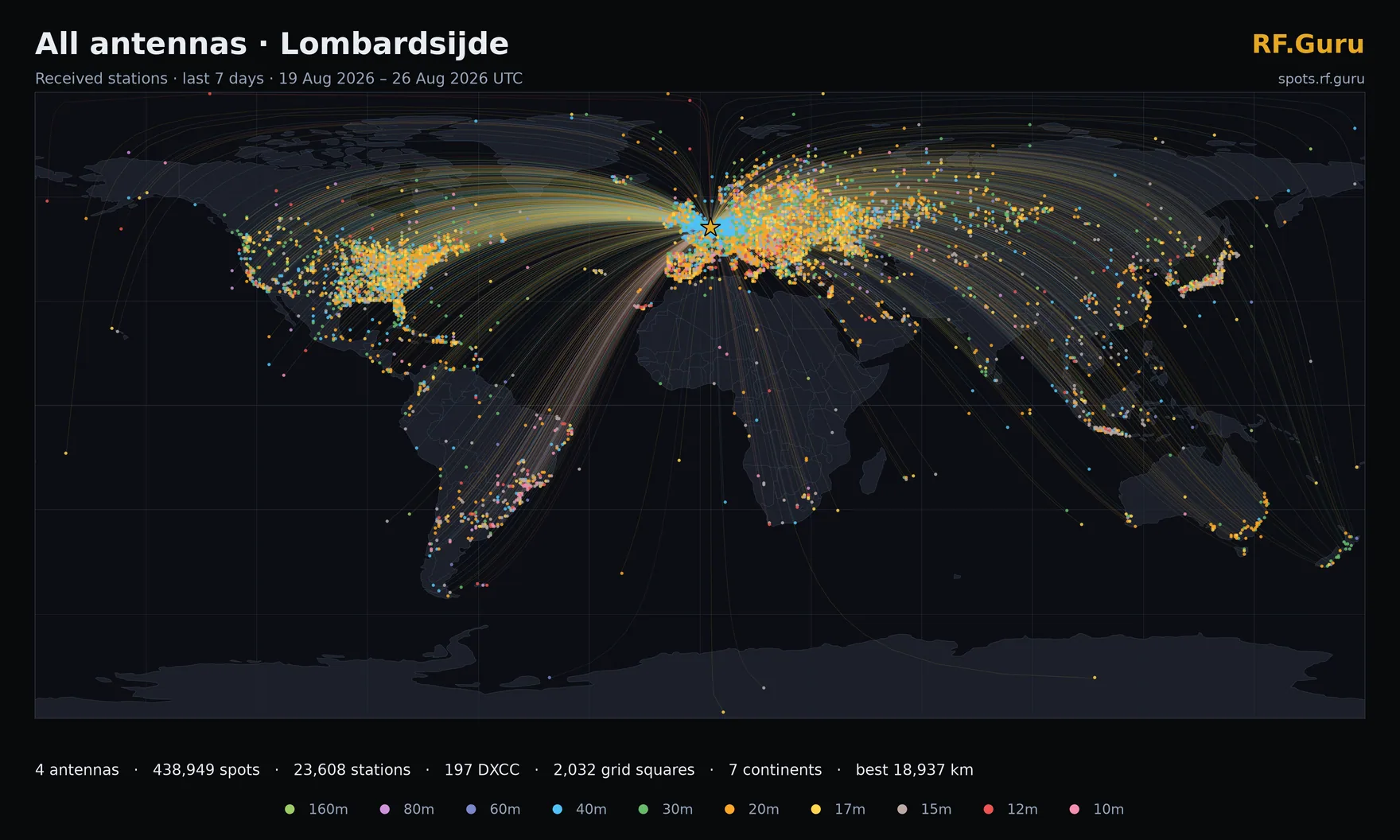
Everything all four antennas heard here in the last 7 days — see them one by one.
Four antennas, one location
An E-probe, two shielded loops and a loop-on-ground, all hearing the same band at the same moment. Switch between them mid-signal and hear the difference for yourself.
Open to everyone
No account, no licence, no install. Full 0–30 MHz coverage in the browser, with waterfall, filters and DRM decoding — free for the amateur radio community.
Measured, not modelled
Every coverage map on this page is drawn from stations actually decoded and reported to PSKReporter — no simulations, no marketing patterns.
A deliberately hard site
Two metres below sea level in an urban park full of LED floodlight QRM, with height restrictions on every mast. The results below are what good RX antennas do in a bad location.
The Lombardsijde receivers
Four KiwiSDR/Web888 receivers covering 0–30 MHz, each on its own antenna. Status is read from the receivers themselves — Checking receivers…
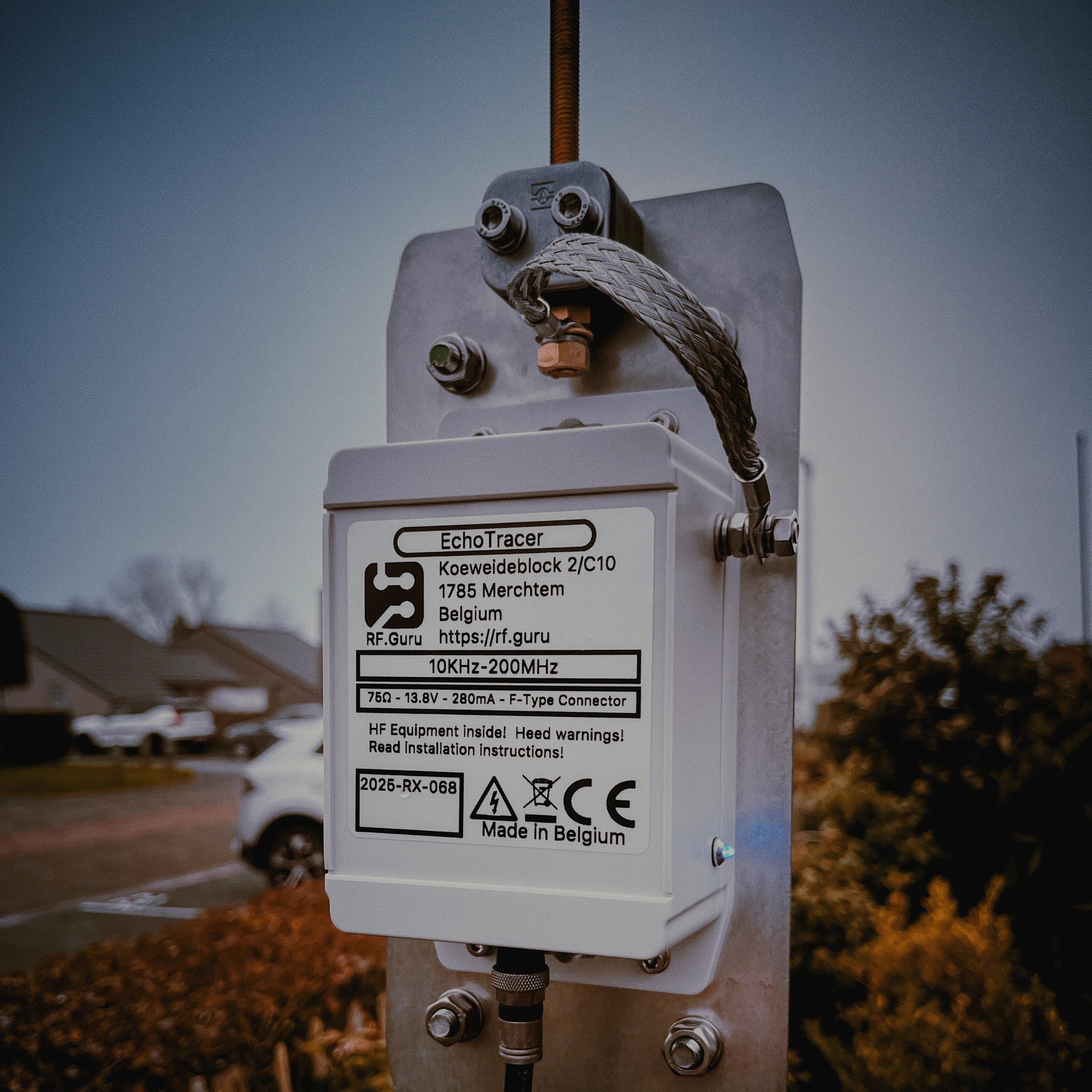
EchoTracer
Active wideband E-field probe
10 kHz – 1.5 GHz · best 160–2 m
The widest ears on site. An active E-probe that hears from the VLF cellar all the way up, so it is the one to reach for when you are chasing something outside the ham bands — utility, broadcast, beacons or time signals.
- Listeners
- 10 / 13
- SNR
- 16 dB
- Uptime
- 5d 13h
ON6URE-LET · reports "RF.Guru EchoTracer"
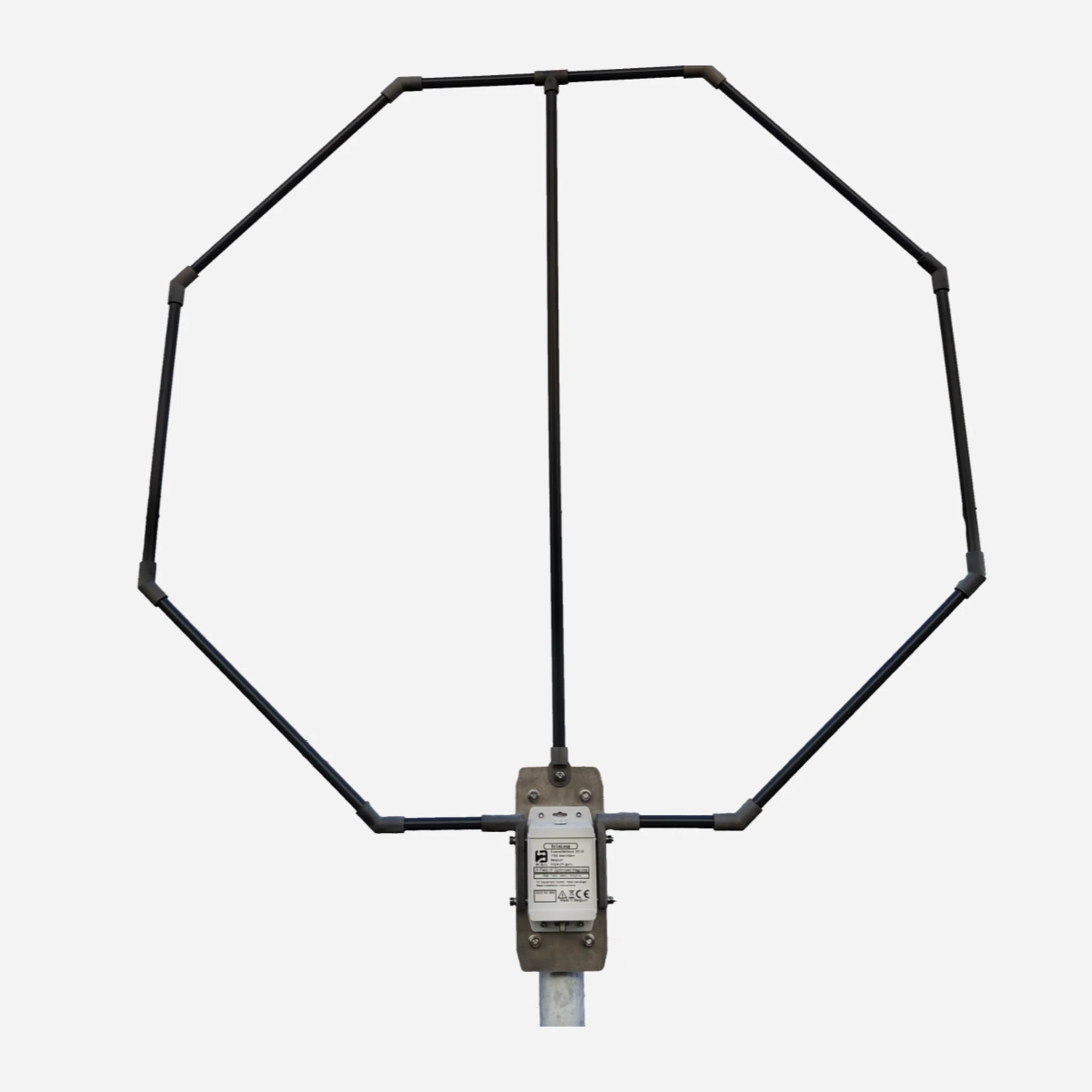
OctaLoop
Shielded active H-field loop
500 kHz – 30 MHz · optimised 2–10 MHz
A shielded magnetic loop with deep directional nulls and a +41 dBm IIP3 front end. The one that stays clean when the band is crowded — null out a local carrier and the DX underneath it appears.
- Listeners
- 10 / 13
- SNR
- 17 dB
- Uptime
- 5d 13h
ON6URE-LOL · reports "OctaLoop"
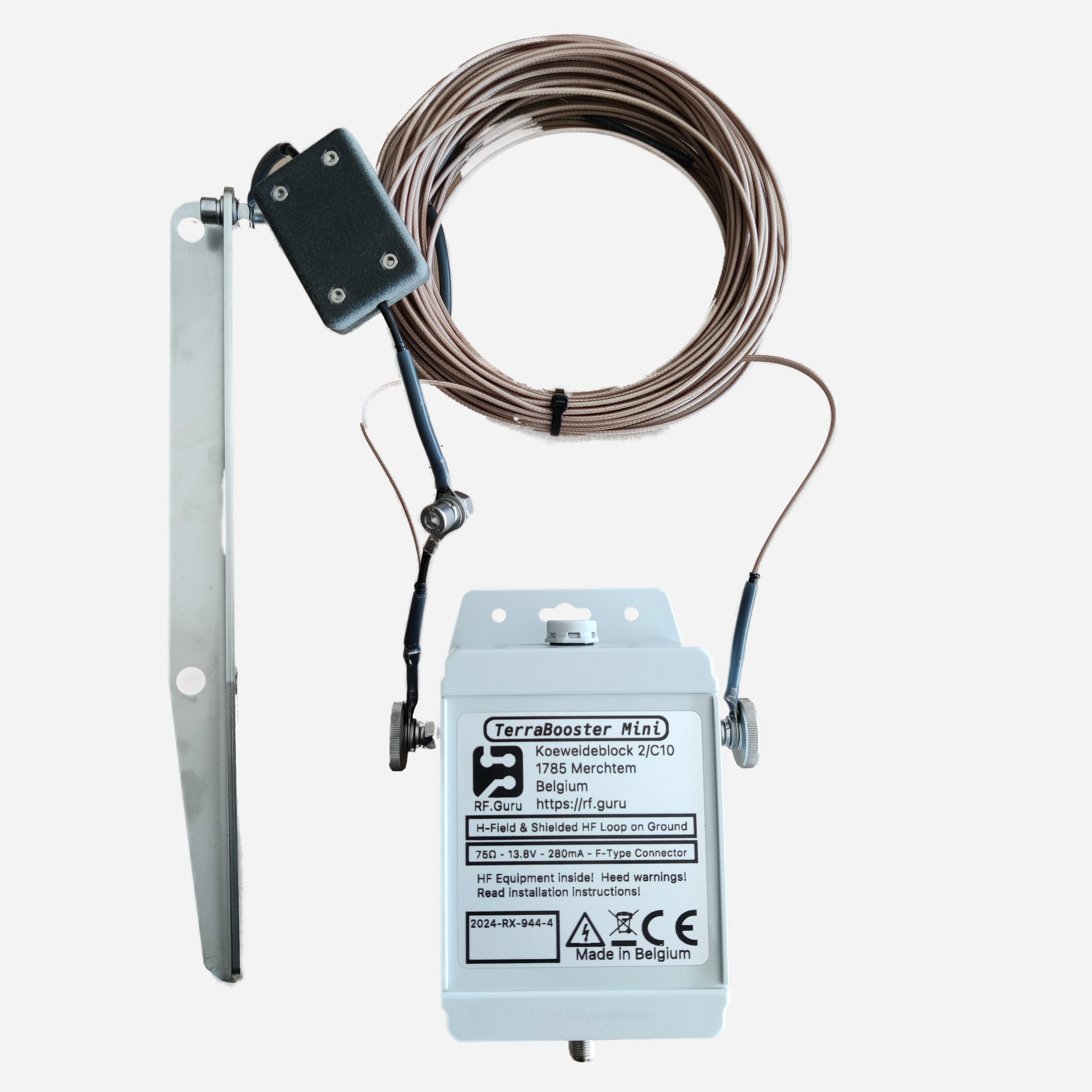
TerraBooster
Active shielded loop-on-ground
500 kHz – 30 MHz · low-band favourite
A loop that lies on the ground instead of fighting for height — which is exactly why it works here. Ultra-low noise with a high dynamic range, and the only antenna on site not held back by the park's height restrictions.
- Listeners
- 10 / 13
- SNR
- 16 dB
- Uptime
- 5d 13h
ON6URE-LTB · reports "RF.Guru TerraBooster"
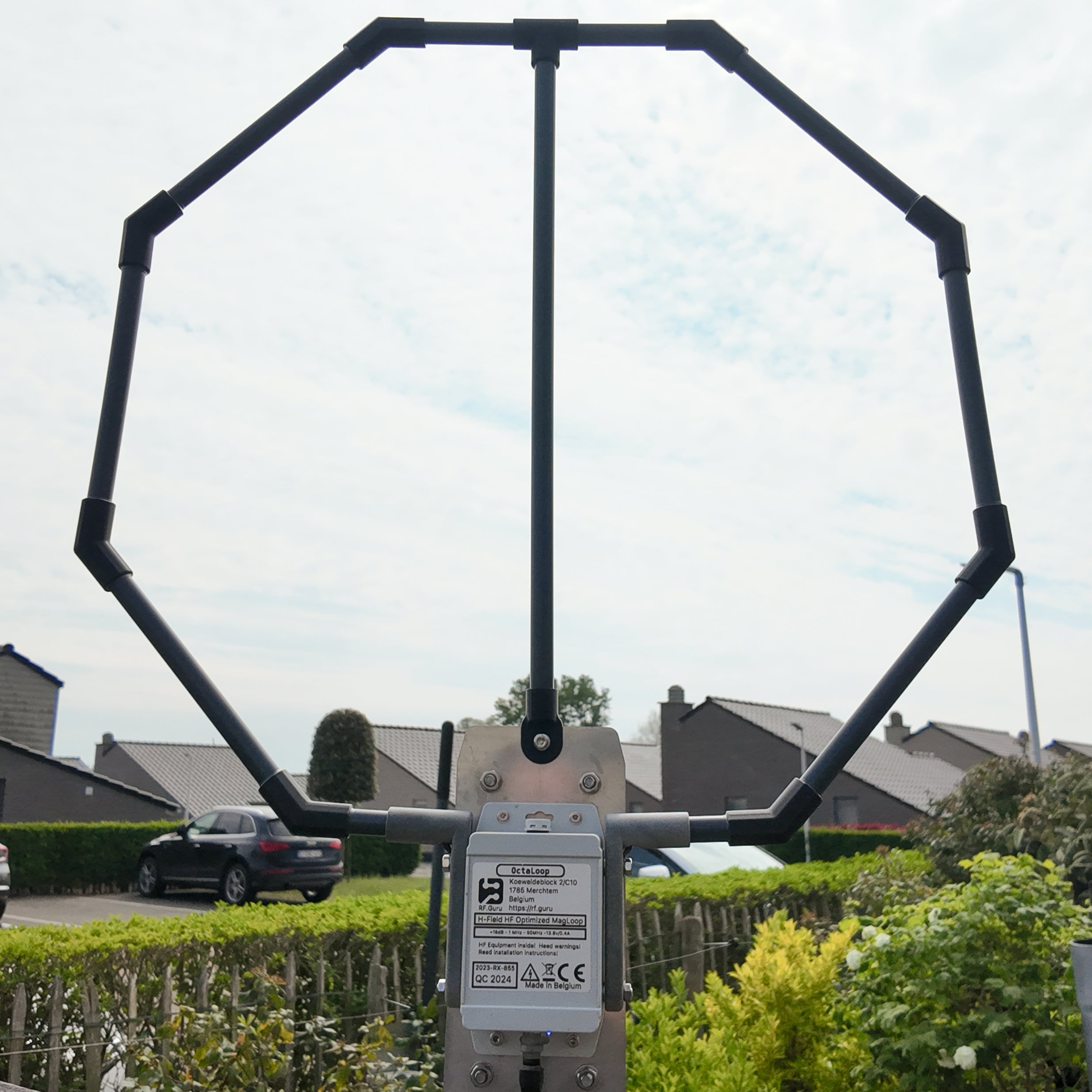
OctaLoop Mini
Compact shielded active loop
500 kHz – 30 MHz
The small-garden OctaLoop. Same shielded H-field design and the same power-off input protection in a size that fits a balcony or a loft — proof that you do not need the space to get on the air receiving.
- Listeners
- 10 / 13
- SNR
- 12 dB
- Uptime
- 5d 13h
ON6URE-LOM · reports "RF.Guru OctaLoop Mini"
The receivers are served over plain HTTP on our own uplink, so your browser will show them as “not secure” — there is nothing to log in to and nothing to send. Channels are shared: when a receiver is full, another listener has to drop before you can join.
A note on the PSKReporter links: that map caps how much it will plot per query, and these antennas hear enough to hit the cap — which drops whole continents rather than thinning evenly. For what an antenna genuinely reached, use the coverage maps below or spots.rf.guru, both drawn from our own archive.
What each antenna actually hears
Every station decoded and reported to PSKReporter, redrawn every 12 hours. The combined plate is everything the site heard; below it, the same window per antenna — same site, same radios, only the antenna changes. Switch between Digital, CW and SSB to see which of those paths were strong enough to work by ear.
Every station actually decoded — FT8 and friends, which pull signals out of noise a human ear cannot follow.
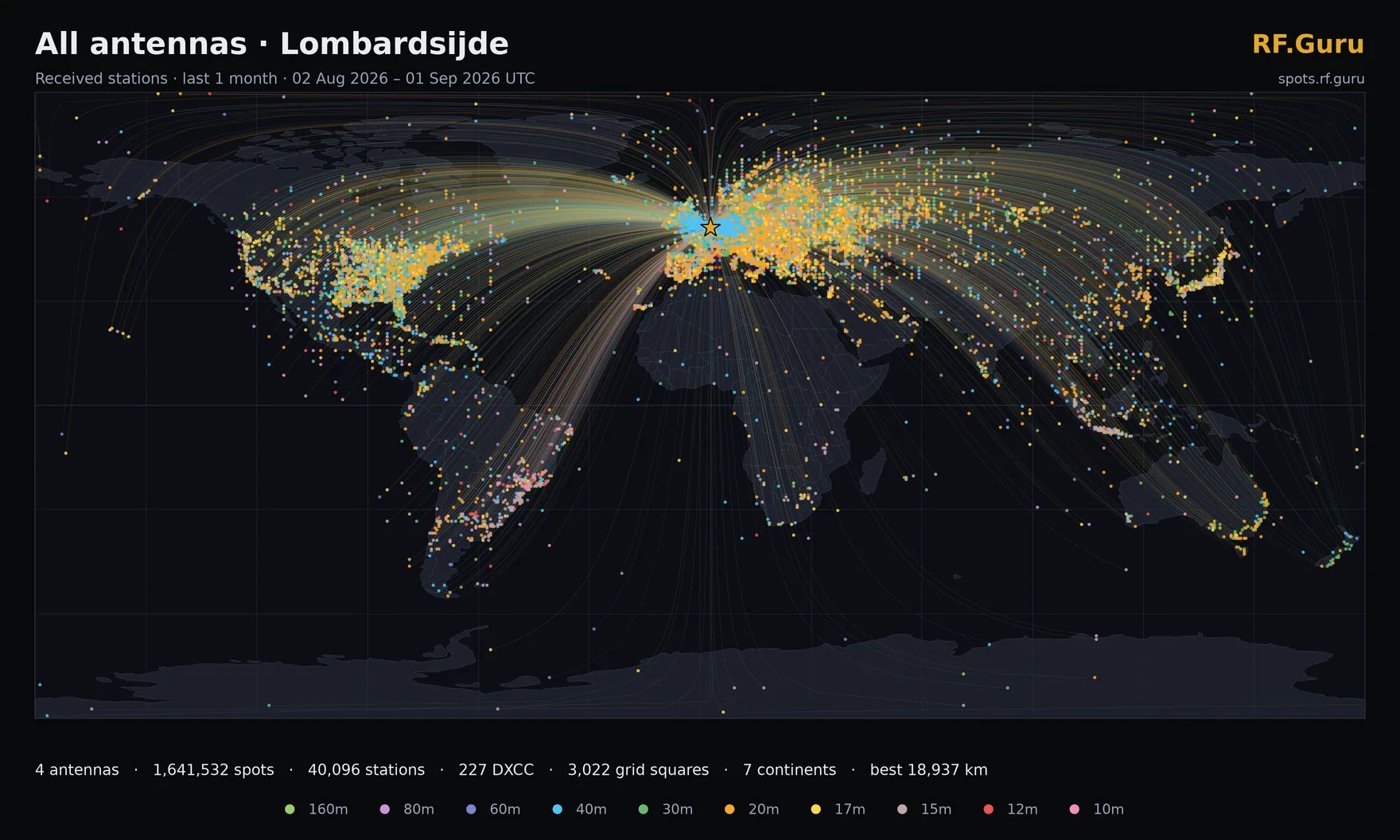
All antennas combinedWhole site
1mo · digital · Lombardsijde- Spots
- 2,073,752
- Stations
- 47,162
- DXCC
- 246
- Continents
- 7
- Best DX
- 18,939 km
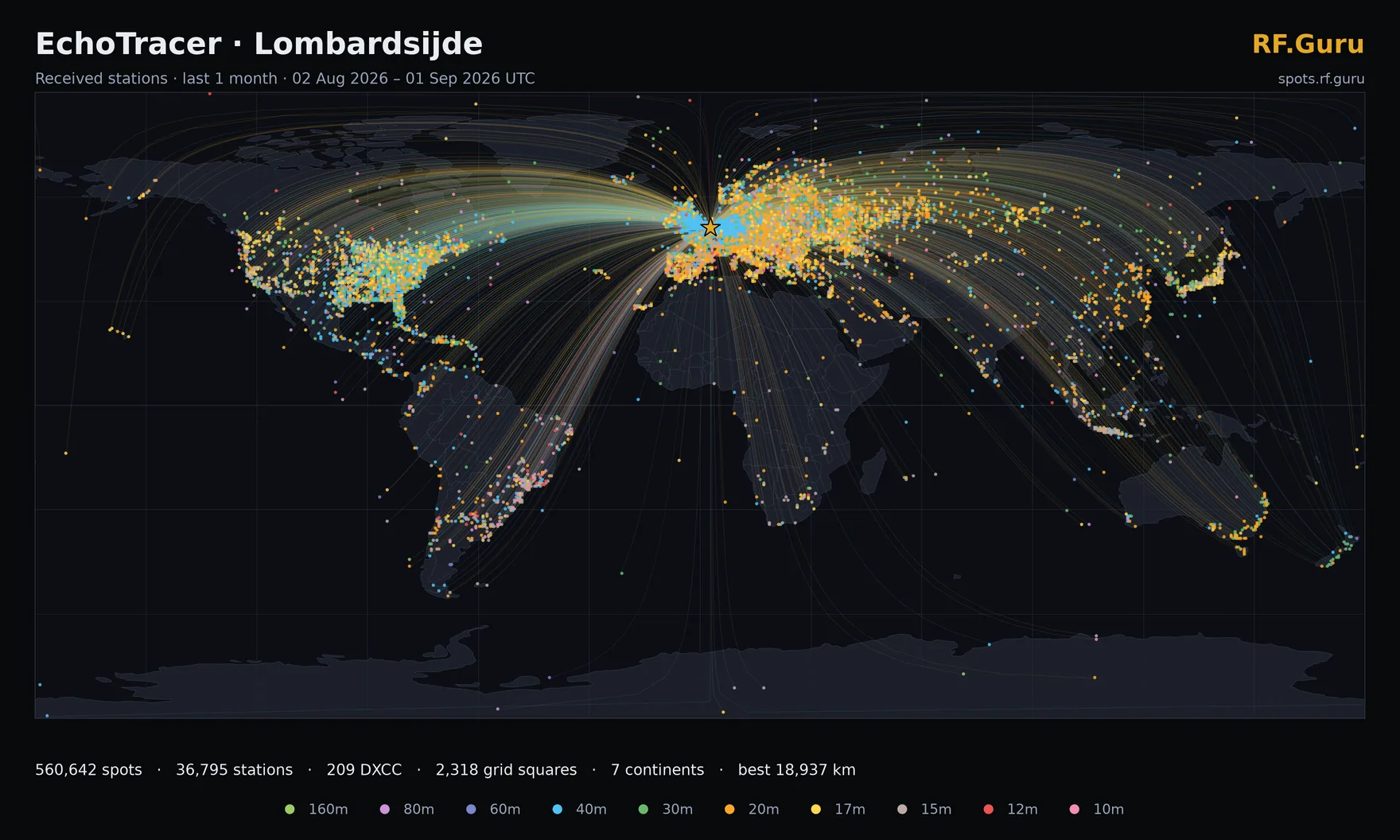
EchoTracer
1mo · digital · ON6URE-LET- Spots
- 572,629
- Stations
- 36,907
- DXCC
- 214
- Continents
- 7
- Best DX
- 18,939 km
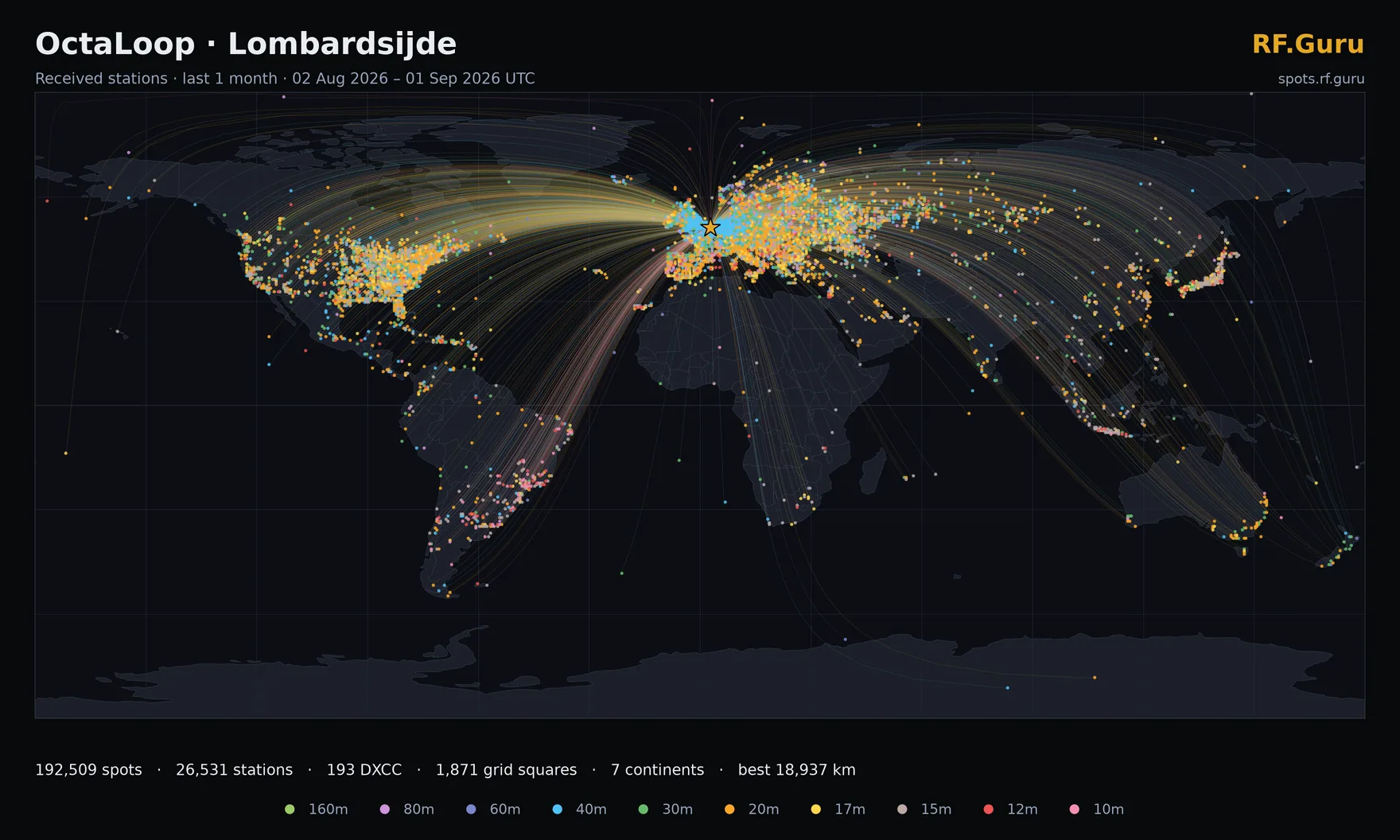
OctaLoop
1mo · digital · ON6URE-LOL- Spots
- 561,971
- Stations
- 37,099
- DXCC
- 211
- Continents
- 7
- Best DX
- 18,939 km
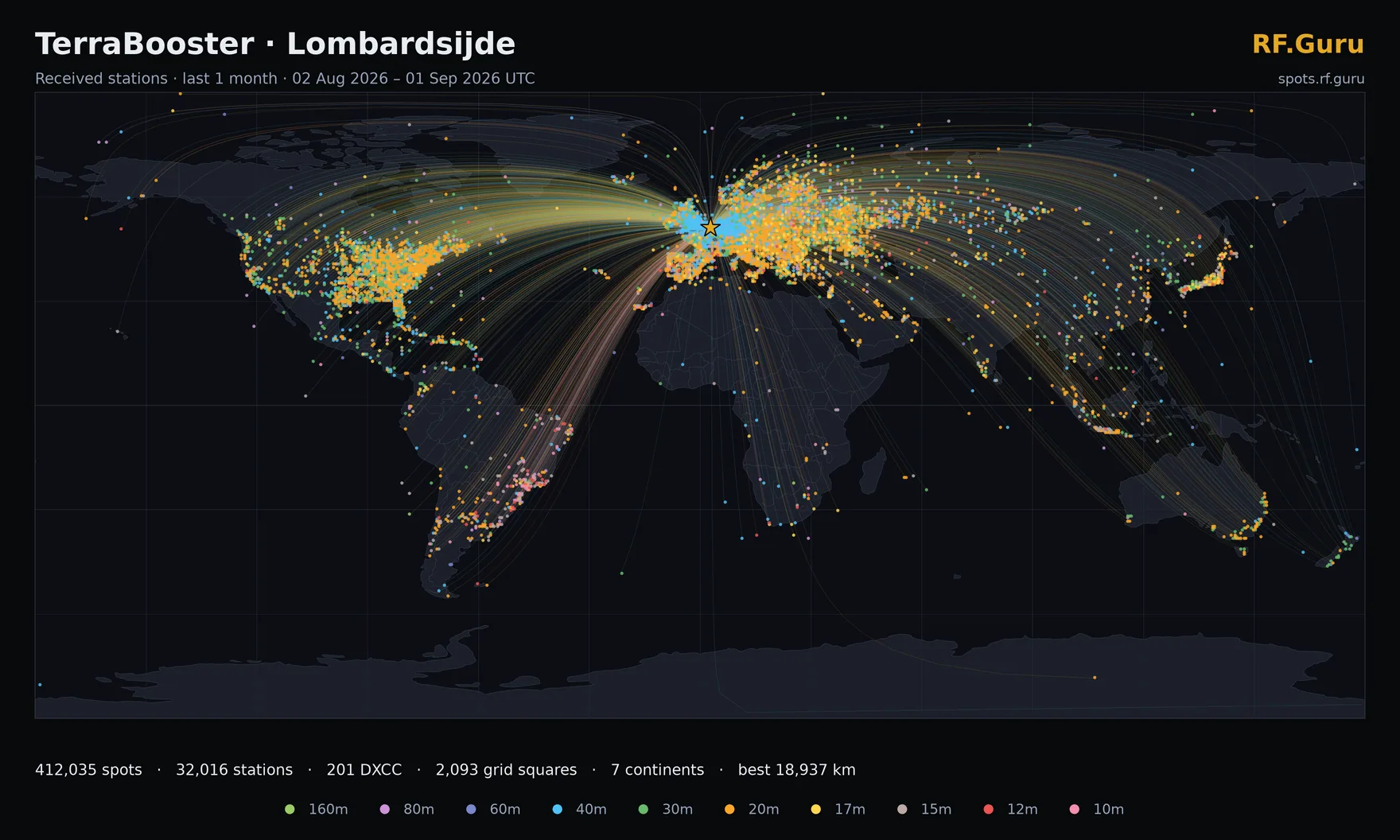
TerraBooster
1mo · digital · ON6URE-LTB- Spots
- 410,147
- Stations
- 31,462
- DXCC
- 212
- Continents
- 7
- Best DX
- 18,939 km
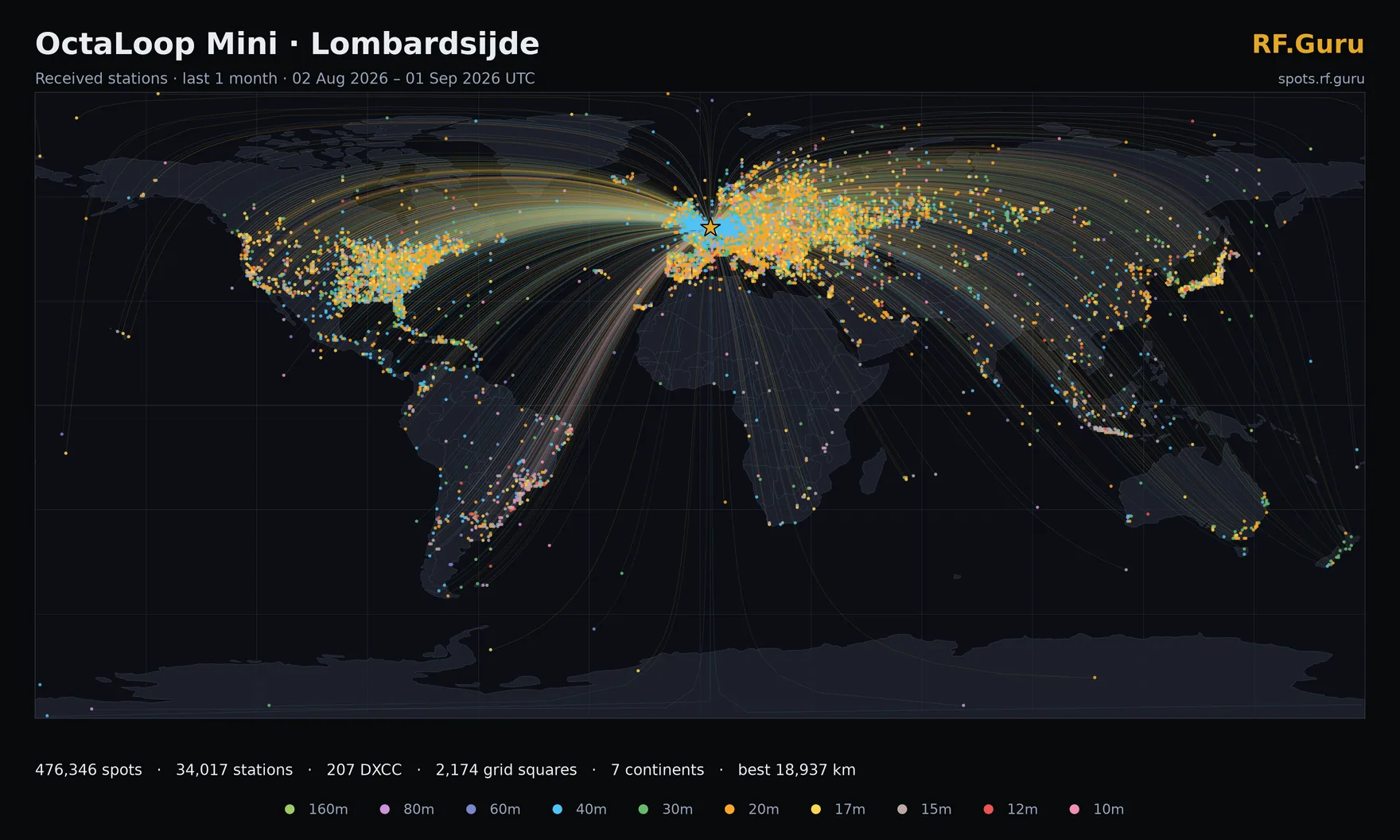
OctaLoop Mini
1mo · digital · ON6URE-LOM- Spots
- 493,248
- Stations
- 33,970
- DXCC
- 212
- Continents
- 7
- Best DX
- 18,939 km
Maps are generated from our own spot archive by a scheduled job and published as WebP — link to them freely. The short windows redraw every 12 hours; the longer ones on their own slower schedules. Every plate is also published at 3520 × 2112 and in a light theme, for slides, print or a white page.
See what we are hearing this minute
The coverage maps above are fixed windows from the last 24 hours out to 12 months. spots.rf.guru is the live view: every signal decoded by every antenna at every site, plotted the moment it arrives, with the longest paths ranked and an auto-tour that walks you through them. Filter by site, antenna, band and mode, or query the archive — a full year of spots, kept and searchable, so you can compare an opening today against the same one last spring.
- · Live map, updating continuously
- · Per-site and per-antenna filtering
- · Band, mode, distance and SNR filters
- · A year of history, queryable
Also running at Lombardsijde
The receivers are not the only thing listening on that mast.
Our listening sites
Three locations, one of them public today.
Lombardsijde
JO11 · −2 m ASL
Our coastal listening station, and on paper a terrible one: an urban recreational park two metres below sea level, LED floodlights throwing QRM across the spectrum, and height restrictions that keep every antenna too low — the TerraBooster excepted, because it lies on the ground by design. It still turns in the numbers you see on this page. That is the point: a good receiving antenna earns its keep in a bad location, not a perfect one.
Read the full story of the Lombardsijde listening stationMerchtem
JO20No SDR yetOur development site, currently being rebuilt. There is no public SDR here at the moment and none is promised for now — when the reconstruction is finished we will add receivers to this page.
Heure
JO20Future siteThe quiet one. Far enough from human activity to put antennas where they want to be rather than where they fit, which is the single biggest upgrade any receiving site can get. We expect it to be fully operational by the end of 2027.
Every antenna on this page is one you can buy
Nothing here is a prototype or a special build. The four receivers run the same production antennas we ship — which is why we are happy to leave them online, in a bad location, for anyone to judge.
Questions
How to use the receivers, and what the numbers mean.
Do I need an account, a licence or any software?+
None of the three. The receivers are open to everybody — click Listen and the SDR opens in your browser, no plugin and no install. You do not need an amateur radio licence to listen, only to transmit. If all channels are busy the receiver will say so; try another antenna or come back in a few minutes.
Why four receivers instead of one?+
Because the antenna is the interesting variable. All four sit at the same location, on the same KiwiSDR/Web888 hardware, hearing the same band at the same moment — the only thing that differs is what they are connected to. Flip between them on a marginal signal and you can hear an E-probe, a shielded loop and a loop-on-ground disagree, which is a far better argument for a receiving antenna than any datasheet we could write.
One shows “Offline” or “Status unknown” — what happened?+
Offline means the receiver itself told us so, or actively refused the connection — almost always antenna or SDR maintenance, and the other receivers on site keep running. Status unknown is different and weaker: our status check got no reply at all, which can just as easily be a network problem between us and the receiver. We show the two separately rather than painting both red, because a working receiver labelled “down” would stop you clicking on something that is perfectly fine. When it says unknown, try it anyway.
What are the coverage maps actually showing?+
Every station each antenna decoded in the window — real received signals reported to PSKReporter, not a modelled pattern or a simulation. They are redrawn every 12 hours from our own spot archive. Because all four antennas run continuously side by side, comparing their maps over the same window is a fair fight.
PSKReporter shows fewer continents than your maps — which is right?+
Ours. PSKReporter limits how much it will plot for a single query, and these antennas produce more than enough spots to run into that limit routinely. What gets dropped is not an even sample — whole continents can fall off the map while the busy European paths stay — so a genuine opening to South America or Oceania may simply not be drawn. The coverage maps on this page and the views on spots.rf.guru are built from our own archive with no such cap, and those are the ones to trust. We still link PSKReporter per antenna because it is a useful independent check — just do not read a missing continent there as an antenna that could not hear it.
Can I use these recordings or spots in my own project?+
Yes — listen, record, screenshot, use it in a presentation or a club talk. A credit back to sdr.rf.guru is appreciated but not required. If you want the raw spot data rather than pictures, the live and historical views on spots.rf.guru are the place to start.
Something not working?
A receiver stuck offline, a question about which antenna suits your location, or an idea for the network — we would like to hear it.